Integrating with Xero
Pathfix allows you to easily add end-user OAuth based integration, handling authorization and enable communication between your app and Xero in just a few minutes.
Before proceeding, you will first need to register your application with Xero. Please refer the developer documentation provided by Xero here: https://developer.xero.com/myapps.
Please note: You will need to create an account with Xero to access this.
Enable OAuth in Xero
Access your Application on Xero
Once you have added your application, you will need to navigate to Credentials
- Select the App you want to enable the connection
- Navigate to Details section

- Navigate to OAuth 2.0 credentials and add the Pathfix Redirect URI https://labs.pathfix.com/integrate/command under the Redirect URI section

- Copy the Client ID and Client Secret

Setup in Pathfix
- Login to your Pathfix account and click on Add Application
- Add the name of your SaaS and hit Save
- Select Xero from the list of providers to integrate with. You can change the Display Name and Description.
- Enter the Client ID and Client Secret generated from Xero
- You can modify the scopes to add scopes you want to access and hit Save
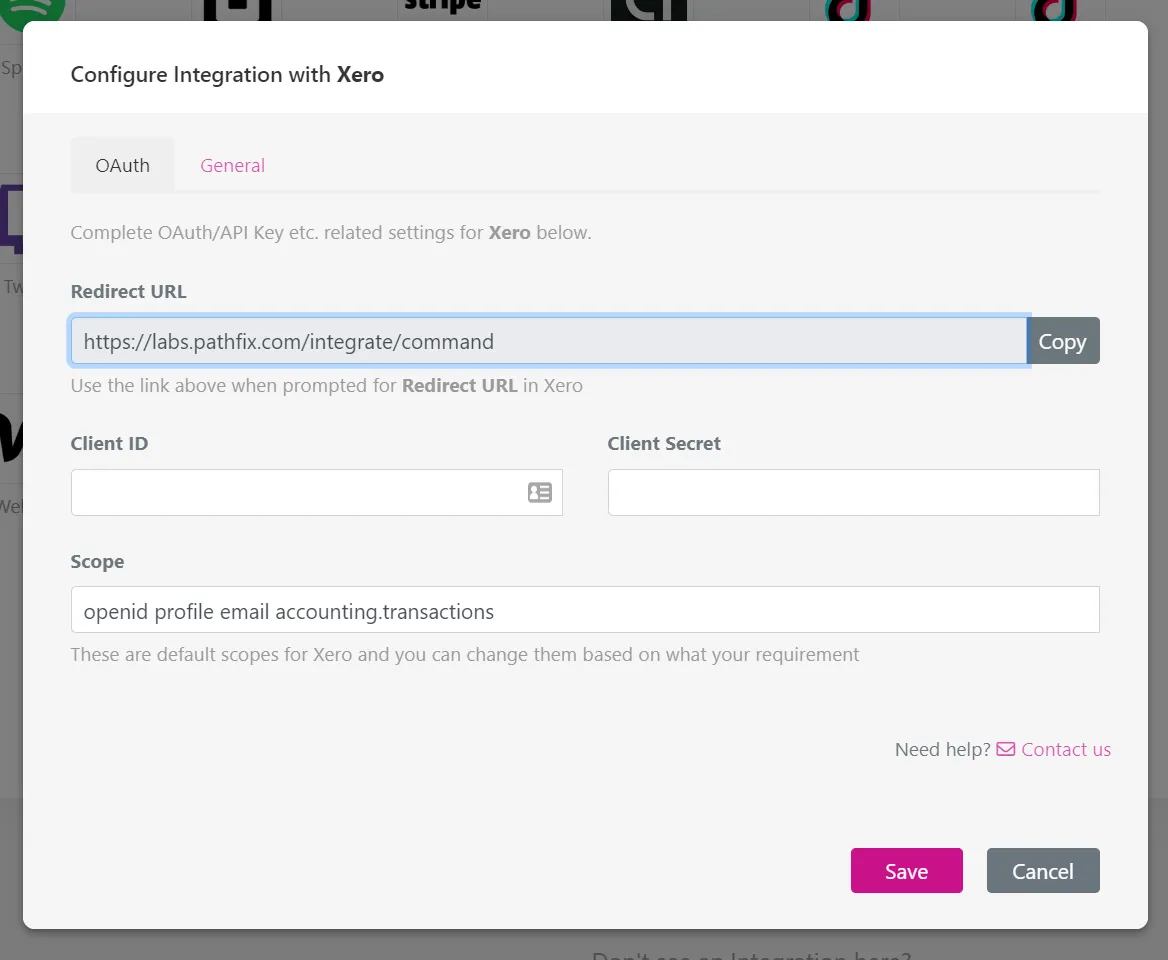
- Click on Test Connection and Connect an account to test the setup
- Once connected successfully, you will be able to choose a sample API from the dropdown to run test API calls
- Select a sample API from the dropdown and click on Send
Adding Integration To Your SaaS
There are 2 steps to adding the integration to your SaaS
To add the integration to your Bubble app, please follow this documentation Bubble.io Setup
Need help? Reach out to us at [email protected] and we would be happy to assist!